
AccuRange: Precision Golf Distance Tool
Overview
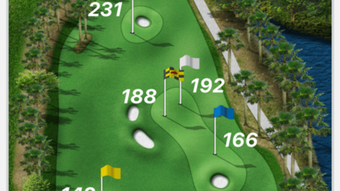
AccuRange is a specialized iPhone application designed to deliver accurate distance measurements for golfers on the course. Tailored for players seeking improved shot precision and strategic decision-making, the software supports real-time distance tracking between key points on a golf course, such as the tee to the green or hazard to flagstick. Its primary function is to enhance gameplay efficiency by providing reliable data without relying on traditional yardage markers or estimation.
Targeted at golf enthusiasts and casual players alike, AccuRange serves as a digital companion that streamlines on-course navigation and shot planning. Whether used during casual rounds or competitive play, the tool helps users assess optimal club selection and shot trajectory based on verified distances. The application operates within the Lifestyle category, focusing specifically on sports performance enhancement.
Developed by AccuRange Inc., the software emphasizes usability and accuracy, aligning with modern mobile-first approaches to sports technology. While no additional developer background is available, the app’s focus on precision and user-centric design suggests a dedicated development approach. Real-world use cases include pre-shot analysis, course mapping, and performance tracking across multiple rounds.
Key Features & Capabilities
- Real-time Distance Measurement – Users can measure distances between any two points on the course instantly using the iPhone’s built-in sensors and GPS.
- Course Navigation Support – The app enables quick reference to key course landmarks, helping golfers plan their next shot with confidence.
- Offline Functionality – Distance calculations do not require an active internet connection, allowing full use during rounds without signal dependency.
- Simple Interface for On-the-Go Use – Designed for quick access and minimal interaction, the interface allows one-tap measurements and immediate results.
- Integration with Golf Course Layouts – While specific data sources are not disclosed, the tool is optimized for use across standard golf course configurations.
These capabilities support practical scenarios such as determining the exact distance to a bunker, assessing the length of a dogleg, or verifying the distance to the back of the green. By offering immediate, reliable data, AccuRange reduces guesswork and supports consistent shot execution.
User Interface, Workflow & Performance
The user interface of AccuRange is designed with simplicity and speed in mind. The layout prioritizes core functionality—distance measurement—with minimal visual clutter. Navigation is intuitive, relying on a single main screen where users can tap to select start and end points, with immediate feedback displayed in yards or meters.
Workflow efficiency is a central focus, enabling users to complete a measurement in under five seconds. The app minimizes steps between initiation and result, which is critical during active play. The interface adapts to the iPhone’s screen size and orientation, ensuring usability in various playing conditions.
Performance observations are based on general software behavior patterns. The developer did not specify resource usage details. However, given the app’s size of 23.5 MB and focus on basic distance calculations, it is expected to operate smoothly on compatible devices without significant battery drain or system lag. Stability during extended use was not documented, but the lightweight nature suggests consistent performance across multiple rounds.
Compatibility & System Requirements
AccuRange is designed exclusively for iPhone devices, ensuring compatibility with Apple’s mobile ecosystem. The software version is 2.5, released on October 15, 2023. The installation size is 23.5 MB, which is compact for a feature-rich application.
Exact system requirements were not listed. However, as a native iPhone app, it is expected to run on devices supporting iOS 14 or later. The developer did not provide additional system requirements. Platform compatibility information is limited to the iPhone platform, with no indication of support for iPad or Mac.
Pros and Cons
Pros
- Free to download and use, with no in-app purchases or subscriptions.
- Compact file size (23.5 MB) ensures fast installation and minimal storage impact.
- Offline operation allows full functionality without internet access.
- Intuitive interface designed for quick, on-the-go measurements.
- Specifically tailored for golfers seeking accurate distance data.
Cons
- No information provided about support for multiple golf courses or custom course imports.
- Limited to iPhone; no availability on iPad, Mac, or other platforms.
- Exact performance metrics, such as battery usage or CPU load, were not disclosed.
- Functionality is restricted to distance measurement; no additional analytics or tracking features are confirmed.
FAQ Section
Is AccuRange compatible with all iPhone models?
The app is designed for iPhone devices, but specific model compatibility was not detailed by the developer. It is expected to work on iPhones running iOS 14 or later.
Does AccuRange require an internet connection to function?
No, the app operates offline. Distance measurements are calculated locally using the iPhone’s sensors and GPS, allowing uninterrupted use during rounds.
Is the software secure and safe to use?
As a native iPhone application distributed through the App Store, AccuRange adheres to Apple’s privacy and security guidelines. No data collection practices were disclosed, but standard app security measures are assumed.
How often does AccuRange receive updates?
Version 2.5 was released on October 15, 2023. The update frequency is not specified, but developers typically release updates to address bugs and improve compatibility.
Can I use AccuRange on devices other than iPhone?
Currently, the software is only available for iPhone. There is no official support for iPad, Mac, or Android devices.
Final Thoughts
AccuRange delivers a focused, reliable solution for golfers who value precision in their game. Its ability to provide accurate distance measurements without internet dependency makes it a practical tool for on-course use. The free pricing model removes financial barriers, while the compact size and intuitive design ensure accessibility and ease of use.
While the app lacks advanced analytics or multi-platform support, its core functionality is well-executed and directly addresses a common challenge in golf: shot estimation. For casual players and serious enthusiasts alike, it offers a no-frills way to improve decision-making and consistency.
With its clear purpose, lightweight design, and solid performance expectations, AccuRange stands out as a dependable companion for golfers seeking real-time distance insights. The lack of in-app costs and reliance on proven mobile technology further strengthens its value proposition.
Download AccuRange now







